PandaDoc Review: Streamlining Document Automation and eSignatures

The "paperless office" has been a goal for decades, but the reality of business documents often remains a mess of PDF attachments, scanned signatures, and lost email threads. For modern sales and legal teams, this inefficiency is a major bottleneck. PandaDoc has emerged as the premier solution to this problem, offering a complete document automation platform that goes far beyond simple e-signatures.
In 2026, PandaDoc has solidified its position as the go-to tool for creating, sending, and tracking professional business documents. By combining a powerful document editor with legally binding e-signatures and deep CRM integrations, it allows organizations to close deals faster and with more transparency. This review explores how PandaDoc is redefining the document lifecycle for modern enterprises.
Tool Overview: What is PandaDoc?
PandaDoc is an all-in-one document automation software that streamlines the process of creating, approving, and signing proposals, quotes, and contracts. It provides a centralized hub for all business documents, ensuring brand consistency and legal compliance.
The platform's standout feature in 2026 is its "Document Intelligence." It doesn't just send a file; it tracks how the recipient interacts with it. You can see which pages they viewed, how long they spent on each section, and exactly when they downloaded it. This real-time feedback allows sales teams to follow up with surgical precision when a prospect is most engaged.
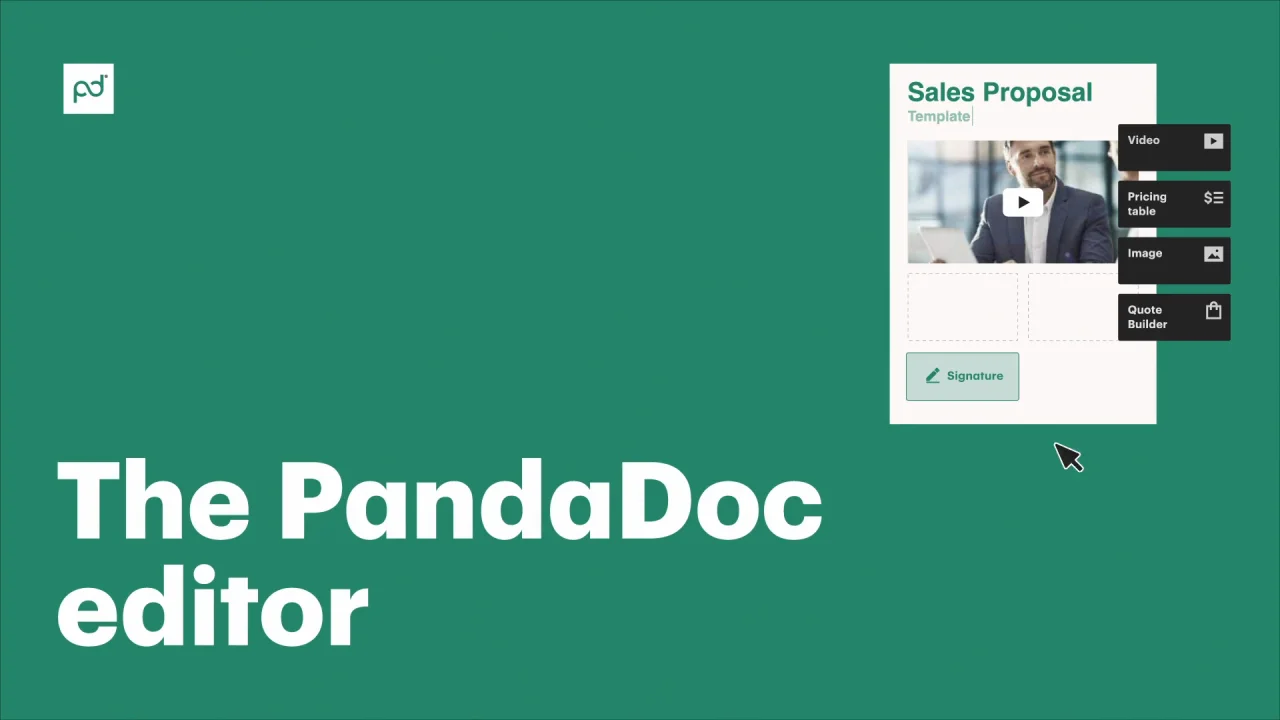
Alt: "PandaDoc's drag-and-drop document editor showing a library of pre-built blocks for pricing, images, and signature fields"
Key Features
- Drag-and-Drop Editor: Create stunning, on-brand documents from scratch or using hundreds of professional templates.
- Legally Binding eSignatures: Securely sign and collect signatures on any device, fully compliant with ESIGN and UETA.
- Real-Time Analytics: Track recipient behavior, including time spent on pages and document status changes.
- Interactive Pricing Tables: Allow clients to choose options and quantities within the document, with totals updating automatically.
- Approval Workflows: Ensure every contract is reviewed and approved by the right internal stakeholders before it's sent.
- CRM Integrations: Pull data directly from HubSpot, Salesforce, and others to populate documents instantly.
Pros and Cons
Pros
- Incredible time savings through automated document creation.
- Beautifully designed documents that impress clients.
- The most intuitive e-signature experience on the market.
- Robust tracking provides invaluable sales insights.
- Seamless integration with virtually every major CRM.
Cons
- Pricing can be high for smaller teams or low-volume users.
- Advanced formatting can occasionally be tricky in the editor.
- The mobile app is good but not as powerful as the desktop version.
Pricing Overview
PandaDoc offers a variety of plans, including a unique free e-signature plan that is a favorite for many small businesses.
| Plan | Price (Monthly) | Key Features |
|---|---|---|
| Free eSign | $0 | Unlimited document uploads & eSignatures, Mobile app |
| Essentials | $19 | Document editor, Templates, Real-time tracking |
| Business | $49 | CRM integrations, Content library, Approval workflows |
| Enterprise | Custom | SSO, Salesforce integration, Custom user roles, API |
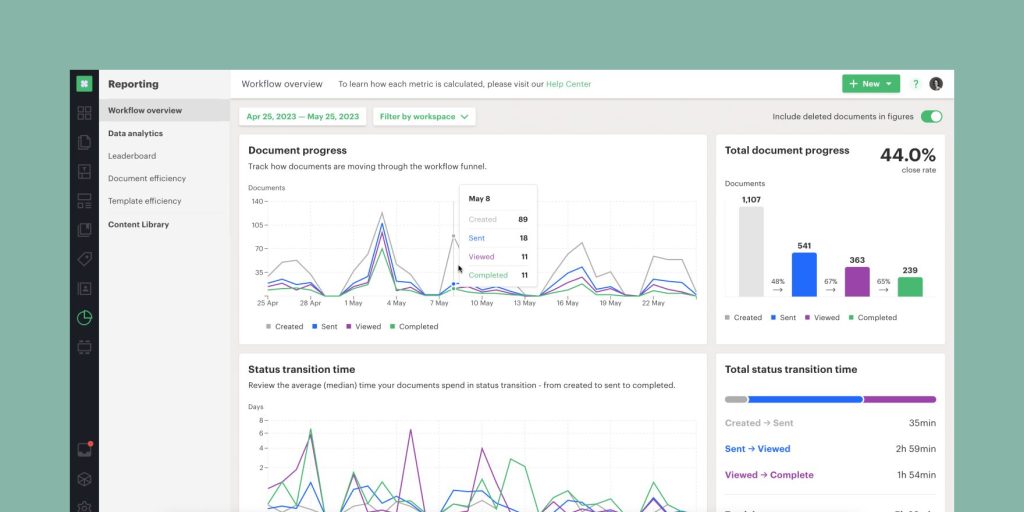
Alt: "PandaDoc tracking dashboard showing a timeline of when a proposal was opened, viewed, and signed by multiple parties"
Use Cases
PandaDoc is a versatile tool that fits into various business functions:
1. High-Velocity Sales Teams
Sales teams use PandaDoc to generate quotes and proposals in seconds by pulling data directly from their CRM. The interactive pricing tables allow prospects to customize their order, speeding up the negotiation phase.
2. HR and Onboarding
HR departments use the platform to send offer letters and employee handbooks. The tracking features ensure that they know exactly when a candidate has reviewed their offer, and the e-signature makes the final step effortless.
3. Legal and Compliance
Legal teams use the approval workflows and content library to ensure that all contracts use the most up-to-date, approved language, reducing risk and improving consistency across the organization.
Comparison: PandaDoc vs. DocuSign
In 2026, DocuSign remains the market leader for enterprise-grade e-signatures. However, PandaDoc has won over a massive following by focusing on the "Document" rather than just the "Signature." DocuSign is essentially a digital envelope for PDFs. PandaDoc is a complete document creation engine. If you want to build beautiful, data-driven documents from scratch and track how they are read, PandaDoc is the superior choice for modern growth teams.
Final Verdict
PandaDoc is a game-changer for any business that relies on professional documents to close deals. It successfully bridges the gap between creative design and legal necessity. In 2026, its commitment to "Document Intelligence" provides a level of insight that was previously impossible. If you are tired of "flying blind" with your business documents and want a more polished, automated approach, PandaDoc is an essential investment.
FAQ
Is PandaDoc secure?
Yes, PandaDoc uses enterprise-grade encryption and is fully compliant with major global regulations including GDPR, HIPAA, and SOC 2.
Can I use my own templates?
Absolutely. You can upload existing PDFs or Word docs, or build your own master templates directly within the PandaDoc editor.
What CRMs does it integrate with?
PandaDoc has native integrations with Salesforce, HubSpot, Zoho, Pipedrive, Microsoft Dynamics, and many more.
Does the recipient need a PandaDoc account?
No, recipients can view and sign documents on any device without ever needing to create an account or download software.